WiFi Lora 32 Touch Screen v4 dont update flashweb

Hello Folks! I just bought 2 v4 to flash meshtastic… the first is just normal version i could flash perfectly, but i bought one of them Wifi LORA 32 with touch screen and I cant flash it from flasher.meshtastic… very strange when i can do it with other board… any clue?

tahnks

Hi,

  1. simple but happens: 2nd board = new COM no.
  2. download the update as file and then make the choice from you comupter iso online.
  3. with the V4 Expansion version I had to choose the “.tft.” update version.
    It helped me but perhaps does not meet your problem. Anyway, give it a try!
    Good luck
    Helge
1 Like

step 1. Visit web flash tools = https://esptool.spacehuhn.com/
step 2. Download firmware with keywords tft and factory . example = firmware-heltec-v4-tft-2.7.17.a5f975abe.factory.bin

enjoy

1 Like

Hi, I am having a similar issue.
I used the esp tool to flash but the screen will not display.
The version online is 2.7.15. Where to find .17?
It came with 2.7.16 and that works. Can I get a link to that version and compare?

https://resource.heltec.cn/download/WiFi_LoRa_32_V4/firmware/Touch

alternatively you may check the nightly build from meshtastic

https://nightly.link/meshtastic/firmware/workflows/main_matrix/master

Funny, I have been looking at those two pages daily waiting.
There is no TFT version on the nightlys yet.

I see there is a bug in the github saying TFT builds for V4 are not working yet. I’ll have to wait.
Maybe when I did the ‘erase’ from the web flasher I removed something important?

the tft version for V4 is now on nightly builds. I’ll try that
https://nightly.link/meshtastic/firmware/workflows/main_matrix/master/firmware-esp32s3-heltec-v4-tft-2.7.19.e9d4485

EDIT
It did not work for me. The screen still did not work with this new nightly build.

This worked great first time. Heltec and other tools failed every time. I thought I had bricked my V4 Touch.

Smiles

Actually it works, if you still have the file, look for the xxxtftxxxxfactory.bin

When you use the linked flashing web site, what number did you put in the 0x box?

I found the good video
https://www.youtube.com/watch?v=NNXZOnf5NNk

The TFT is in the esp32-S3 release on the meshtastic github! included on 2.7.14 and above.

The problem with my unit is it starts a reboot loop when I install the firmware. I can tell because the device is detected over and over in the device manager and I hear the tone of device connect.
This is without a battery.

EDIT: I did get the flash to work and it does not bootloop. I can connect with bluetooth so I believe the firmware is good but still no display. the screen is on, from the glow but the UI, old or new, does not display.

EDIT SOLUTION:
The meshcore flash removed the littlefs. To get it working again I first flashed the littlefs file, then the factory file and selected Erase First. Using the meshtastic web flasher worked.

here some guide.

  1. log on https://esptool.spacehuhn.com
  2. connect to usb and put esp32 device to bootloader mode
  3. delete all from the flash file check box
  4. load the v4 TFT firmware
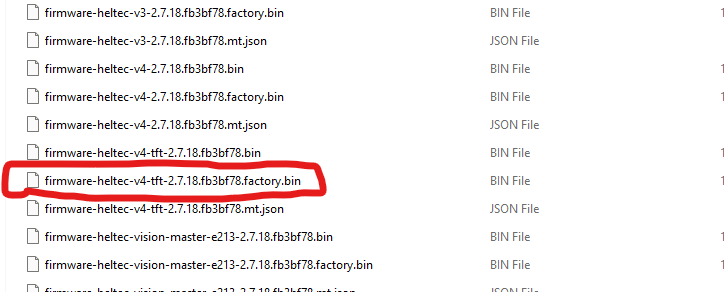
    example = firmware-heltec-v4-tft-2.7.18.fb3bf78.factory.bin
    ** unzip the zip file that you downloaded from nightly build. locate the file v4-tft with factory.bin ! not the normal v4-tft.bin !!
  5. the click flash.
    enjoy

place to download the firmware

  1. [Release Meshtastic Firmware 2.7.18.fb3bf78 Alpha · meshtastic/firmware · GitHub] https:// github. com/ meshtastic/ firmware/releases /tag/v2.7.18.fb3bf78

  2. scroll down, download firmware-esp32s3-2.7.18.fb3bf78.zip

  3. unzip the download file name with heltech-v4-tft-xxxxx.factory.bin
    example picture below

1 Like

To get the screen to work again I had to also flash the littlefs.bin file.