
I just received a new LoRa module. I expected to receive a base/power distribution board as Richard indicated that they found an issue in that circuitry. How a new LoRa module is supposed to fix this is beyond me. I’ve asked for clarification, awaiting a response.
Heltec MeshTower resets its configuration itself
Hi, I am also experiencing problems and resetting the MESHTOWER device.
Tested two times with different temperatures (Street temperature -12 -16°C and House Attic house temperature +17°C) and with all the firmware’s presented
here
https://resource.heltec.cn/download/MeshSolar/firmware
- firmware-heltec-mesh-solar-2.7.14.e959000.uf2
- firmware-heltec-mesh-solar-2.7.15.567b8ea.uf2
- meshsolar_meshtastic_2.7.4.uf2
and on Github Meshtastic Firmware 2.7.17.9058cce Alpha
The operating time before crashing / freezing and resetting all settings is 10-15 hours in any use, I also tried with and without the connected solar panel from the kit.
I noticed a feature that after the MeshSolar - BMS freezes, it does not respond to commands on Param Sync https://resource.heltec.cn/utils/flash to connect, you need to flash* Meshsolar BMS Stock Firmware (meshsolar_bms_0.0.1.uf2), then configure from scratch as a new device 
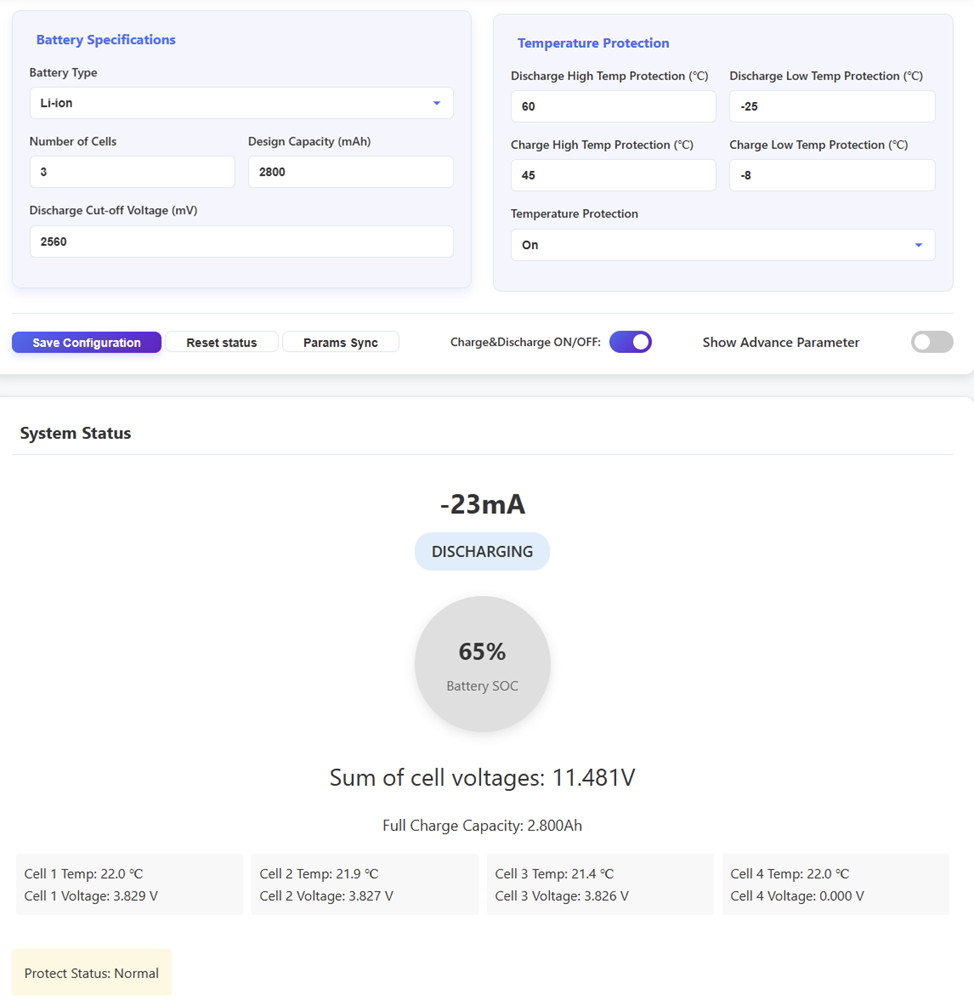
I do have the same issue. Rebooting every 10 minutes or so. But even after disconnecting the solar panel, and disconnecting the battery. Then connecting it to a 20v USBC power source (two red leds). The same behavior persists. Reboot with some settings (like the clock) resetting. (Using Meshcore Firmware 1.11.0)
This has happened to me and was due to low battery brownout – if the battery dropped very low before shutdown, it might have caused corruption during the power-down sequence.
Check your batteries and set the shutdown voltage setting – In Meshtastic, you can set device.shutdown_on_battery_level or the minimum voltage threshold. Setting this a bit higher (e.g., 3.3V or 20%) gives the device time to shut down gracefully before the battery gets critically low.
I can confirm that i have the same problem. As soon as i flashed Meshcore 1.11.0, my meshtower worked for several days. After a shotdown, Now it just reboots every 9 -10 minutes… it doesn matter if is battery powered or connected to 20v USBC.
I have just
- erased the flash using meshcore web flasher
- rebooted into DFU and flashed meshsolar_bm_0.0.1.uf2 from : https://resource.heltec.cn/download/MeshSolar/firmware/bms
- can confirm that MeshSolar WebSerial Tool https://flash.nmiot.net:3333/ works
- flashed meshcore 1.11.0 using meshcore web flasher
- once meshcore is flashed, the MeshSolar WebSerial Tool will not work anymore. I’m not sure if any changes on the BMS params are persisted or not…
I can confirm the meshtower keeps rebooting every 10 minutes…
Currently this is a huge disappointment, considering the cost of the meshtower!
Trying this now:
Patch for the 9-minute reboot with the new watchdog-module in Heltec MeshTower, MeshSolar & Heltec V4 -> https://github.com/meshcore-dev/MeshCore/pull/1446/commits/c89a0e9929f4247d40569f568ccb1d216cc66762
Patch is not merged in the project yet, therefore compiled firmware by Koen de Jong: https://share.procolix.eu/s/EnFtFHGaBYfaYxJ
1 Like
Flashed and i can confirm currently the uptime is over 42 minutes. I will put this on test and report it here.
Thank you @Kasper-86 for this links
Edit: 9h uptime. Looks like this patch works well!
Please let me know if the solution of Kasper-86 is working for Meshcore only. I’m using Meshtastic on Mesh Tower. I mean, is there any workaround for Meshtastic?
Thanks
I’ve been having the same issue. What I noticed is, I can see the board in the Meshtastic app as soon as I connect to it it disappears and I can also no longer see it from another node. The first time I built it it ran for about 2 weeks. I am getting around two or three days now. The temperature hasn’t been lower than 40° or higher than 85°. I have 2.7.4firmware. I was given this node by my local Meshtastic group, which was given to them from Heltec for testing. I was so close to mounting on the roof of my house. From everything posted here it looks like something they will either need to be replaced or modded to resolve the issue. What do I do? I just reinstalled the BMS, set correct mah for batteries and updated to 2.7.18
Many thanks for your reply yk23. As for me, I installed it on the roof of the house before I found out about all these issues with this model  Now I keep it either inside the house or on the balcony and I restart it from time to time, but this way of working is very annoying and not feasible. I tried to set the batteries via the serial interface and there are problems there as well: it shows as if the power module is configured for only 2 batteries instead of 3, and although it seems to save what I set via serial, it still shows up the same config in the end. Anyway, I’m very disappointed with this model, which seemed promising. By the way, it came with 2.7.6 installed and when I saw the problems, I upgraded it to 2.7.15. For you, with 2.7.18, does it work OK, or do you still have interruptions in operation?
yk23, if is not too much trouble, could you send me the exact procedure for BMS reinstall? thanks a lot
So far it’s still locking up. Also finding if I stop trying to connect to when it displays “too many retries” over Bluetooth, if I delete it from my phones BT connection, that’s when I discover it lost it config. If I retry too many times, the Bluetooth connection stops responding. For the BMS, I just dragged the BMS File in to the NRF drive letter during boot with it connected to a Windows computer. Not sure if it did anything. The charging indicator now only shows when pressing the display button, only for a few seconds. It used to stay on. BTW I notice there’s a hint of a burnt smell on the board that wasn’t there when I 1st powered it up. I suspect it’s some sort of hardware failure. It makes sense since it worked for so long but appears to be getting worse.
next weekend I’ll do my best, I’ll try again and I’ll come back to you with my results, thanks a lot yk23
I saw this yesterday, but I didn’t grasp everything on this list so I’m going to try this. Where is the R 23 resistor located? I can remove it as long as you’re OK with me doing it.
I found R23. Going to try to remove it. it’s under the NRF board. I’m taking it off today. I’ve been running it inside my house sort of one big lock up with a battery shut down error.! I tried to reply but it says I’m limited to 3 reply’s. I updated this post ****IMG_1202|375x500
great, please send me a picture of R23 position
thanks a lot
1 Like
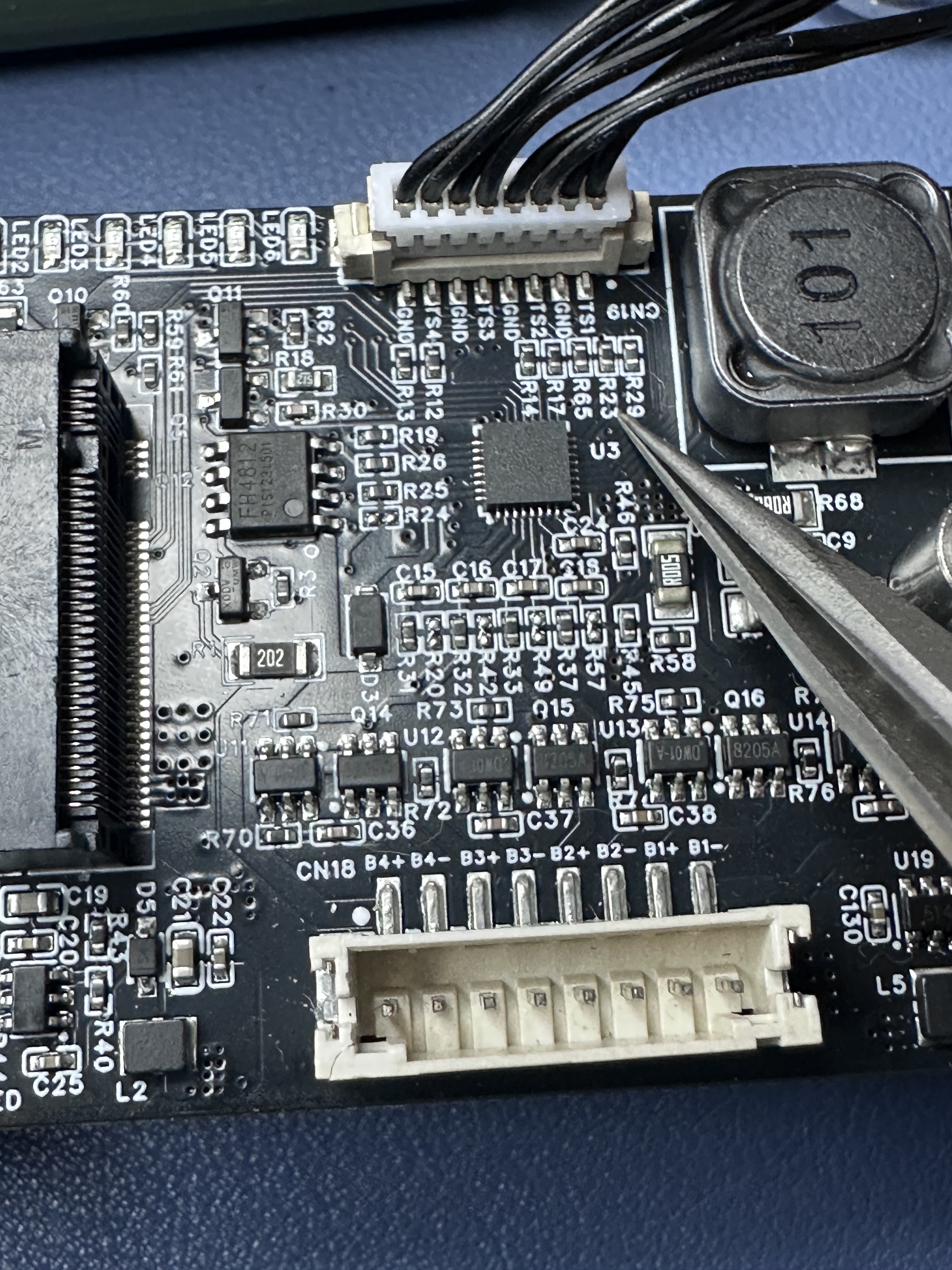
Hey, Thanks. I forgot to tell you, I tried last weekend, with fw 2.7.18, but nothing, the same issue. It worked until midnight when came low temperature outside and that it, lost the connection, the same problem. So, I saw the picture, did you tried to remove R23? If you did, what was the result?
Meanwhile I tried Thinknode M6 from Elecrow and it seems is very stable. Also, I’ll try to build mysef a node with Heltec T114 and Heltec V4. A friend of mine said V4 is the best with LoRa SX1262 chipset. Also, as a advise, come from communities of LoRa, saying that LR1121 chipset is the future, gen 3 of this kind of devices.
Thanks a lot,
George
V4, if you look at the forum posts is still work in progress - if you want to use it, you’ll need to be really really good at debugging.
As for the LR1121, it’s been well superseded by more advanced variations of the LR range, so, well, what can I say?
If you want a good solid LoRa radio, the SX1262 is the latest. If you want extra functionality of varying usefulness then there are many possibilities in the LR range for you to explore.
Many thanks for info, it make sense.
I’m using SC1262, that why I’m checking on LR chipset, I’ll use your advise to check on LR range, except 1121.
King regards,
George