
Hi everyone,
obviously, I am not the only one to post this kind of subject, but I’ve tested everything I’ve found on this forum and I still struggle to make an SD card reader work…
It works with the “File info”, as described on this post.
I also managed to make it work on the SPI1 bus, with “file info” exemple again.
But when I tried the “read/write” example, it soedn’t works… Actually, it works sometimes, only once and then I have to plug it again. my code is below  . I tried different speeds of SPI bus.
I also tried to remove the “read” part. Still the same : Sometimes it Works, sometimes not.
Here is an example of my serial monitor, when I unplug the re-plug my AB02.
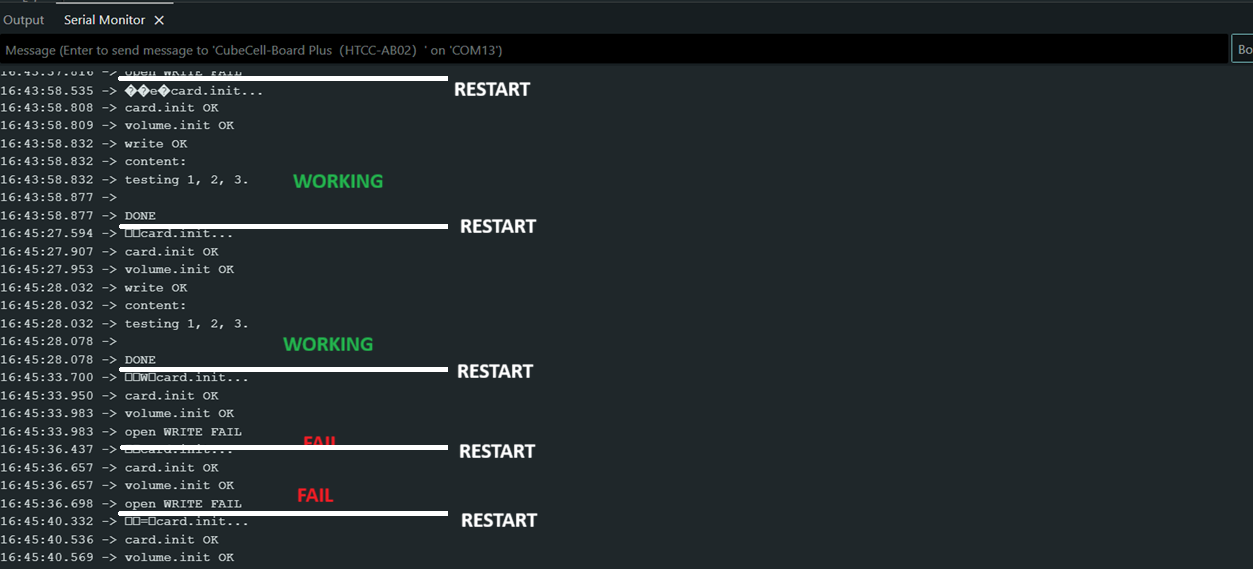
I precise that my SD card reader is an Adafruit, It works perfectly with other arduino boards. The SD card is 8Go and there is no problem as only
Do you have any idea ?
my code :
#include <SPI.h>
#include <SD.h>   //

// --- Objets SdFat bas niveau ---

Sd2Card  card;
SdVolume volume;
SdFile   root;
SdFile   file;

// --- SPI1 pins ---

#define SD_CS   GPIO4
#define SCK1    GPIO3
#define MISO1   GPIO2
#define MOSI1   GPIO1

void setup() {

  Serial.begin(9600);
  while (!Serial);
  pinMode(SD_CS, OUTPUT);
  digitalWrite(SD_CS, HIGH);

  // Init SPI (SPI1)
  SPI.begin(SCK1, MISO1, MOSI1, SD_CS);
  SPI.setFrequency(250000);   // 250 kHz

  Serial.println("card.init...");
  if (!card.init(SPI_QUARTER_SPEED, SD_CS)) {
    Serial.println("card.init FAIL");
    while (1);
  }

  Serial.println("card.init OK");

  if (!volume.init(card)) {
    Serial.println("volume.init FAIL");
    while (1);
  }

  Serial.println("volume.init OK");
  root.openRoot(volume);

  // --- WRITE ---

  if (!file.open(root, "TEST2.TXT", O_CREAT | O_WRITE | O_TRUNC)) {
    Serial.println("open WRITE FAIL");
    while (1);
  }

  file.println("testing 1, 2, 3.");
  file.sync();
  file.close();
  Serial.println("write OK");

  // --- READ ---

  if (!file.open(root, "TEST2.TXT", O_READ)) {
    Serial.println("open READ FAIL");
    while (1);
  }

  Serial.println("content:");
  int c;
  while ((c = file.read()) >= 0) {
    Serial.write(c);
  }

  file.close();
  root.close();
  Serial.println("\nDONE");
}

void loop() {
}